

Download Simple Comic – free comic reader for Windows, macOS, Android & iOS
Overview – Why Simple Comic Stands Out in the Comic‑Reading Landscape
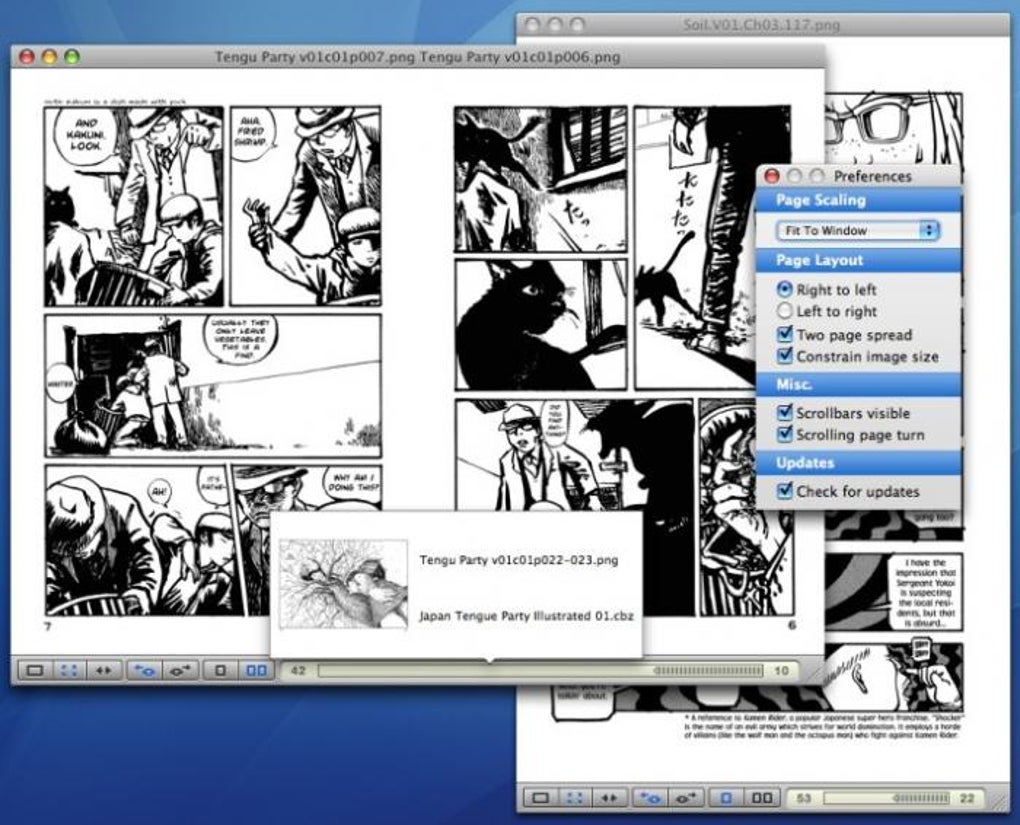
Simple Comic is an intuitive, free‑to‑use comic book reader that targets both casual fans and serious collectors. Built with a lightweight footprint, the app delivers a smooth, customizable reading experience across multiple platforms. Whether you prefer to flip through a graphic novel one page at a time, view a full‑spread double‑page layout, or skim quickly through thumbnails, Simple Comic adapts to your workflow with a few taps. The moment you launch the app, a concise first‑time‑setup wizard invites you to choose default view modes, light or dark themes, and initial zoom preferences—allowing you to start reading without navigating deep menus.
Compatibility is another strong point. Simple Comic supports the most common comic container formats, including CBR, CBZ, ZIP, and even PDF. A handy QuickLook plugin for macOS lets you preview supported files directly from Finder, saving you the step of opening the app just to confirm the title or issue. The reader also remembers the last page you read, so you can pause your adventure and resume later without losing your place.
While the app shines in flexibility, it is not without flaws. Some users have reported occasional control lag and a lack of anti‑aliasing, which can make high‑contrast text appear jagged. Nevertheless, Simple Comic remains a solid, beginner‑friendly solution that balances feature richness with a minimalist design philosophy.
Key Features – What Makes Simple Comic a Must‑Have Tool for Readers
- Supports CBR, CBZ, ZIP, and PDF formats, covering the vast majority of digital comics.
- Single‑page and double‑page view options for close‑up panels or full‑spread layouts.
- Light and dark mode themes that automatically adapt to your system preferences.
- QuickLook plugin for macOS enables instant thumbnail previews from the Finder.
- Customizable zoom, rotation, and pan controls that can be adjusted on the fly.
- Bookmarking and “last page read” memory to pick up exactly where you left off.
- Keyboard shortcuts for page navigation, fullscreen toggle, and rotation.
- Minimal installation size, ensuring fast downloads and low storage impact.
- Free to download and use, with no hidden subscription fees.
- Regular updates that address bug fixes and add incremental improvements.
Installation & Usage – Step‑by‑Step Guide to Get You Reading in Minutes
Getting Simple Comic up and running is straightforward, regardless of whether you’re on Windows, macOS, Android, or iOS. Start by visiting the official website or your device’s app store. For desktop users, download the appropriate installer (EXE for Windows, DMG for macOS) and follow the on‑screen prompts. The installer is under 30 MB, reflecting the app’s lightweight design. Android and iOS users can locate Simple Comic in the Google Play Store or Apple App Store; simply tap “Install” and wait for the automatic download.
Once installed, launch the app. The first‑time setup wizard appears, asking you to select your preferred reading mode (single‑page or double‑page) and theme (light or dark). You can also set the default zoom level and enable or disable the QuickLook plugin if you’re on macOS.
After confirming your choices, Simple Comic presents its clean library view. Drag and drop comic files into the window or use the “Add Files” button to browse your folders. The app automatically extracts the archive and creates a thumbnail preview.
Navigation is intuitive: swipe left/right on touch devices, use arrow keys on a keyboard, or click the on‑screen arrows. To switch between single‑page and double‑page layouts while reading, tap the layout icon in the toolbar. Adjust brightness, zoom, or rotate the page via the settings menu—changes apply instantly, allowing you to fine‑tune your reading experience without leaving the page. When you’re finished, simply close the window; Simple Comic remembers your last page and reopens it automatically the next time you launch the app.
Compatibility, Pros & Cons – How Simple Comic Performs Across Platforms
Simple Comic is built for cross‑platform compatibility. It runs natively on:
- Windows 10 and later (64‑bit)
- macOS 10.13 High Sierra and later
- Android 5.0 Lollipop and newer
- iOS 12 and later (iPadOS included)
Pros – What Users Love About Simple Comic
- Lightweight and fast: Small download size and quick launch times.
- Broad format support: Handles CBR, CBZ, ZIP, and PDF without extra converters.
- Customizable UI: Easy toggling between single/double page, light/dark mode, and zoom.
- Free forever: No hidden fees, no ads, and regular updates.
- QuickLook integration (macOS): Preview comics directly from Finder.
Cons – Areas Where Simple Comic Could Improve
- Lack of anti‑aliasing: Text and high‑contrast graphics can appear jagged.
- Occasional UI lag: Some users report unresponsive controls that require a restart.
- Limited cloud sync: No built‑in bookmarking across devices.
- Missing advanced library features: No tagging or rating system for large collections.
- No built‑in comic store: Users must source files independently.
Overall, Simple Comic offers a solid, no‑cost solution for anyone who wants a fast, customizable comic reader. Its strengths lie in format versatility and a clean interface, while the main drawbacks are minor visual glitches and the absence of cloud‑based library management. For readers who prioritize speed and simplicity over feature bloat, Simple Comic remains a top choice.
FAQ – Answers to the Most Common Questions About Simple Comic
Can Simple Comic open DRM‑protected comic files?
No. Simple Comic only supports non‑DRM formats such as CBR, CBZ, ZIP, and PDF. DRM‑protected files must be removed or converted before opening.
Is there a way to sync my reading progress across multiple devices?
Currently Simple Comic does not include built‑in cloud sync. Users can manually export their bookmark files or use third‑party services like Dropbox to keep the same library on multiple devices.
How do I enable the QuickLook plugin on macOS?
After installing Simple Comic, open the app’s preferences, go to the “Plugins” tab, and check “Enable QuickLook for CBR/CBZ”. Restart Finder (or log out and back in) to activate the preview feature.
Does Simple Comic support keyboard shortcuts?
Yes. Arrow keys navigate pages, “F” toggles fullscreen, “+”/“-” zoom in/out, and “R” rotates the page. Shortcut keys can be customized in the settings menu.
Is there a paid version with extra features?
No. Simple Comic is completely free and does not offer a premium tier. All features are available to every user without a subscription.
Conclusion & Call to Action – Start Reading Your Comics Today
Simple Comic delivers exactly what its name promises: a straightforward, reliable way to read digital comics without unnecessary frills. Its support for the most common archive formats, flexible viewing options, and cross‑platform availability make it an ideal choice for both newcomers and seasoned collectors. While the lack of anti‑aliasing and occasional UI hiccups can be frustrating, they are outweighed by the app’s speed, free price tag, and thoughtful design. If you’re looking for a secure, lightweight comic reader that lets you focus on the art and story, Simple Comic is ready for download.
Ready to dive into your favorite graphic novels? Download Simple Comic now and enjoy a seamless reading experience on Windows, macOS, Android, or iOS. Keep an eye on the update channel for future enhancements, and feel free to share your feedback with the development team – they’re constantly working to refine the app based on user input.







